

When Marina opens the Shelf app from her flat in São Paulo, a tiny piece of code wakes up somewhere in the world to serve her. Until a Tuesday morning last month, that code lived in Brazil — and on her slowest loads it was spending five seconds or more talking to a database in Virginia before Marina could see her shelf.
Today, the same code only runs in Virginia. Marina's slowest loads are about 1.5× faster — and across the app, a typical load is now about half a second.
Edge compute is supposed to be the fast option. For us it was the slow one.
A one-line config change, a Hong Kong bug that started it all, and an API that ended up twice as fast as a side effect.
Let's dig in 👇
A bit of background
Two quick definitions, since they'll matter for everything that follows.
A Cloudflare Worker is, roughly, a tiny piece of JavaScript that runs inside Cloudflare's network. Rather than spinning up a server in one data centre and pointing DNS at it, you hand Cloudflare your code, and they run it in hundreds of locations around the world. You get global scale and (usually) low latency essentially for free, with none of the usual ops overhead. It's a really lovely abstraction.
A PoP — point of presence — is one of those locations. Basically a Cloudflare data centre, with hundreds dotted across every continent, mostly in major cities. When a user makes a request, it lands at the PoP nearest to them, and that's where your Worker runs.
So the default behaviour is: every request runs at the PoP closest to the user. Which is exactly what you want if your Worker isn't making many external requests — if it can do its work locally and ship a response.
It is not what you want if your Worker spends most of its time waiting on a database halfway across the world.
The setup
The Shelf app is powered by our API, which is implemented as a Cloudflare Worker. The Worker itself is mostly glue: most of what it does is reach out across the network. It talks to Supabase (a hosted Postgres), writes to Kinesis, reads from S3, and fans out to a handful of third-party APIs.
A lot of those reads and writes go to things hosted in AWS us-east-1, in Virginia — our Postgres, Kinesis, and S3, in particular.
In plain English: when Marina opens the Shelf app, a Worker somewhere in the world wakes up, makes a handful of round-trips to Virginia, and ships her back a response.
If that "somewhere in the world" happens to be São Paulo, each round-trip to Virginia takes about 100 milliseconds. A typical request makes five or six of them. That's already half a second of pure network time before we've even started executing the database queries themselves.
Going looking for the problem
This didn't actually start as a latency investigation. It started in Hong Kong.
A couple of our Shelf Intelligence features quietly stopped working there. They use AI models that aren't available in Hong Kong, and because the model calls were originating from whichever Cloudflare PoP was closest to the user — for Hong Kong users, that's a PoP in Hong Kong — those requests got blocked at the source.
When we went looking for a fix, the obvious one fell out almost immediately: run the API from a known region instead of from wherever the user happens to be. That solves the Hong Kong problem on its own — the model call now originates from us-east-1, where it isn't blocked.
But once I was already in the traces, a second thing jumped out. Pulling an hour of data from Grafana Tempo:
Our Worker had run across 65+ PoPs on 6 continents in a single hour.
Only ~3.6% of invocations ran in PoPs near us-east-1 (EWR, IAD, CLT). The other ~96% were executing far from the data they needed.
Tail latency mapped almost perfectly to distance from Virginia.
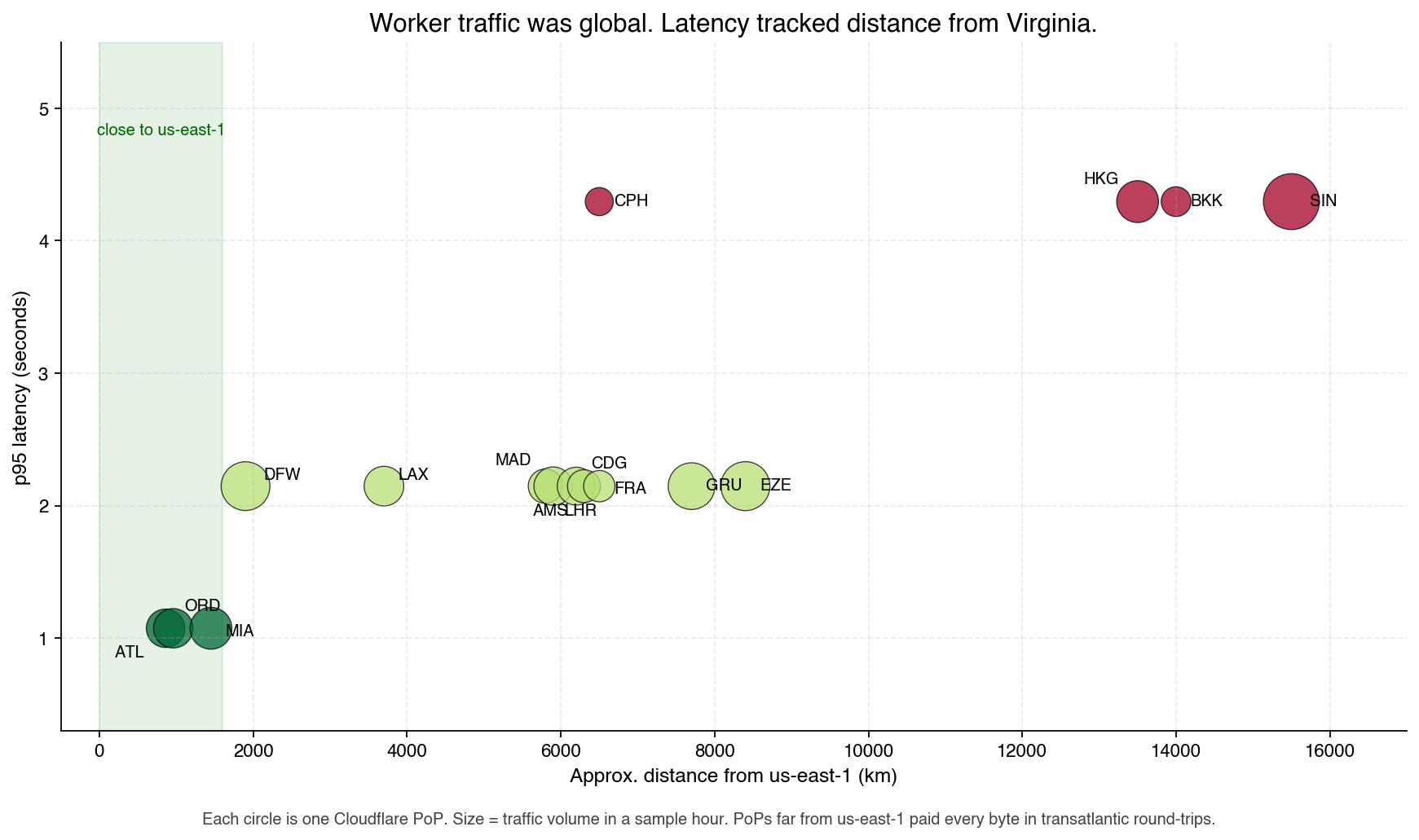
So picture Marina, opening her feed. A Worker in GRU (São Paulo) wakes up, sequentially round-trips to a database in Virginia five or six times, then shoves a response back across the Atlantic. Of course it was slow.
The Hong Kong fix and the latency story were the same fix. Pin the Worker to us-east-1, and Hong Kong gets its features back and Marina probably gets a faster feed. How much faster, I genuinely didn't know — I had a guess of maybe ~50% from eyeballing the traces, but it was a side effect I was curious about, not the thing I was solving for.
Why distance hurts so much
Here's the shape of the cost.
Every API request from the Shelf app makes five or six sequential round-trips to the database before it can respond. When Marina's Worker is in São Paulo and the database is in Virginia, each of those round-trips eats ~100ms of pure network latency. That's ~500ms per request, sitting there on the wire, doing nothing. Multiply by all the database calls a typical screen needs and the picture sharpens fast.
When you move the Worker physically close to the database, each round-trip drops from ~100ms to well under a millisecond. Five round-trips of <1ms is a rounding error. Five round-trips of 100ms each is half a second.
Call this the data-gravity tax 💸 — every byte your code wants from your database costs you a round trip times the distance, and edge compute does nothing to help you pay it. The closer your code lives to your data, the smaller the tax.
The fix
Cloudflare gives you two ways to override the default placement:
Smart Placement profiles your Worker for ~15 minutes after each redeploy and infers where to run it. It's the right call when you have multiple backends in unknown locations.
Explicit region pinning lets you just say "always run here." It's the right call when you know exactly where your backend lives.
We know exactly where our backend lives. So we picked option 2.
"placement": { "region": "aws:us-east-1" }That's the whole change. One line of JSON.
The results
p50: 1.5s → 0.5s (−65%)
p95: 8.6s → 4.3s (−50%)
(Across 9 hours of pre-cutover traffic and 24 hours after.)
I had been expecting maybe a 50% improvement on a good day. The p50 fell by a full two-thirds. And it wasn't a one-day fluke: the improvement has held ever since.
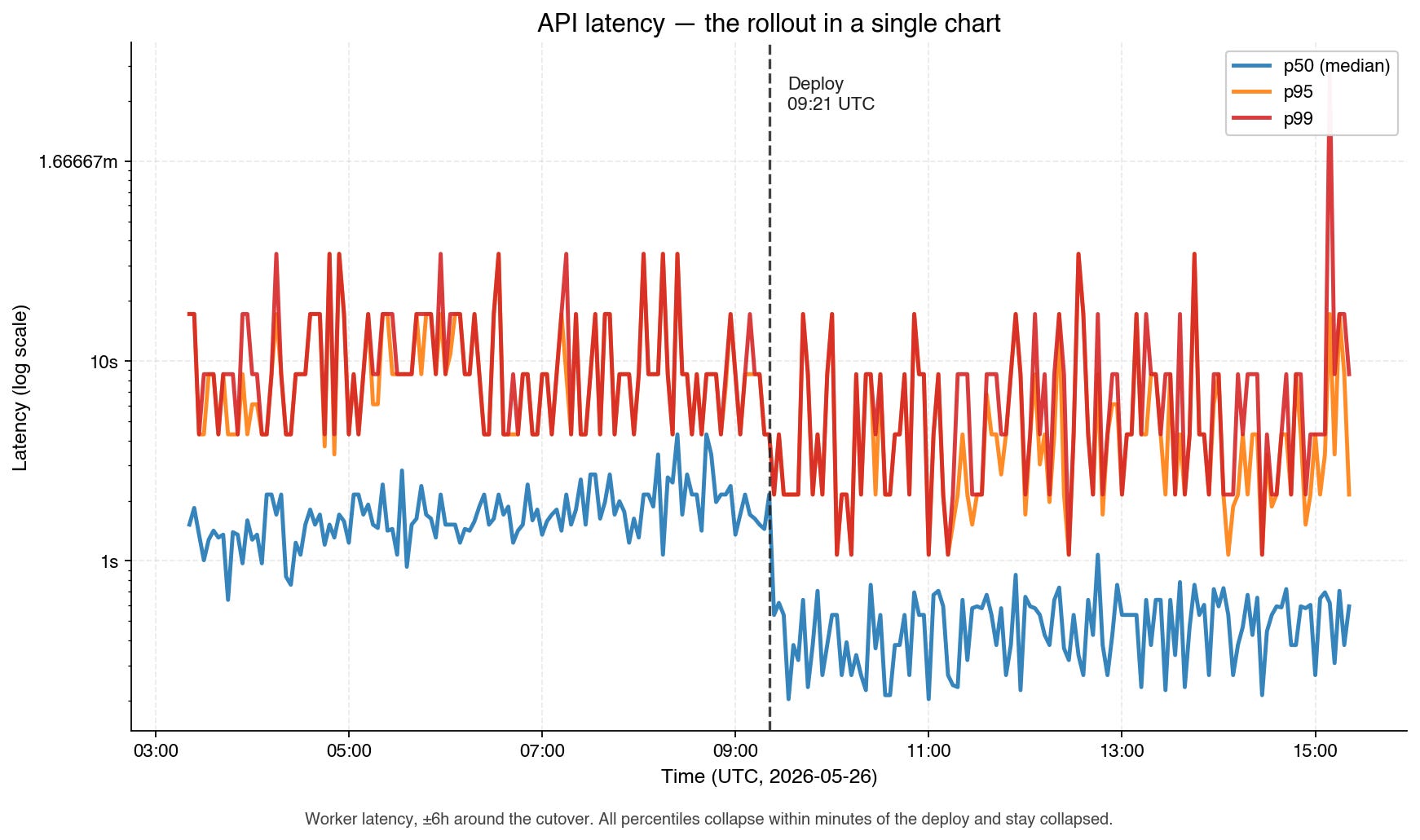
The app now loads and feels meaningfully faster, especially outside North America — exactly the cohort that was hurting most.
Who actually benefited
The improvement wasn't uniform. Pinning Workers to us-east-1 was a bet that Worker → database round-trips dominated total latency — and the bet paid off most for users furthest from Virginia (p95):
🇹🇭 Thailand: 6.1s → 1.9s (3.2× faster)
🇧🇷 Brazil: 5.3s → 3.6s (1.5× faster)
🇲🇽 Mexico: 2.4s → 2.4s (flat)
The further from Virginia you were, the bigger the win.
Oh — and Hong Kong got its Shelf Intelligence features back. The original problem.
What we didn't expect
Users had been quietly giving up.
Cloudflare logged about 6,600 cancelled requests in the 9 hours before the deploy — meaning the client closed the connection before our Worker could respond — and zero in the 24 hours after.
The iOS side told us what those cancellations actually were: users opening the Shelf app, waiting for it to load, getting frustrated, and closing it before anything appeared on screen. Before the fix, roughly 460 users a day were doing this. After: about 260 users a day.
So the fix didn't just make things faster for the users who waited. It recovered around 200 users a day who had been silently bouncing out of the app before it could load — users we'd never have known about as anything more than a cancellation log line.
When this doesn't apply
One important caveat before you go off and pin all your Workers.
This trick only works because our backend is single-homed in a known region. If your reads are CDN-cacheable, run at the edge — that's literally what the edge is for. If your backend is genuinely multi-region, look at Cloudflare's Smart Placement instead. We're trading "fast for everyone in theory" for "fast for everyone in practice" because we know exactly where our data lives.
The data-gravity tax doesn't go away — but you can choose where to pay it.
Takeaway
The edge is a good default, but not always the best solution. Cloudflare's "run near the user" default is brilliant for most workloads — which is exactly why it's invisible. Nobody questions it, nobody re-examines it once they've deployed, nobody profiles it. But "good for most workloads" doesn't mean "good for yours". Pay attention to the data-gravity tax your platform is quietly charging you. Go look at the defaults you accepted years ago.
That's it for now — go pin those Workers if you have the right kind of workload, and have a great week! 👋